
VB SmartTag2.20 - Google Play
You'll be able to see results in few seconds.
Publisher Description
Secure and Perfect Selfie
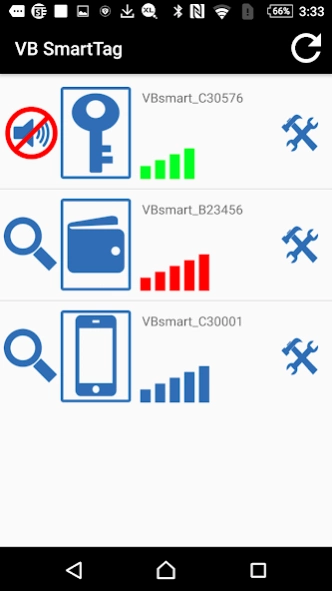
Application to be used with the VoyagerBlue SmartTag and WalletTag products using Bluetooth Low Energy (BLE). The application allows connection and support for up to 2 tags at any at one time, providing immediate and reliable alert / proximity functions. This device will provide peace of mind and aid in protecting your Android Smart phone and tablet as well as, car keys, purse, wallet, Passport or any other valuable assets. The App provides a two way "Find Me" function to help in locating your missing assets and will automatically set a pin drop map location should your items become misplaced or lost.
Key Features of VoyagerBlue Wallet and Smart Tag.
-Support multiple BLE devices (Maximum 2 tags)
-Each tag is configurable for different applications.
-User selectable alert distances.
-Two way Find Me function for lost or misplaced items.
-Automatically reconnects each tag after waking up from sleep mode.
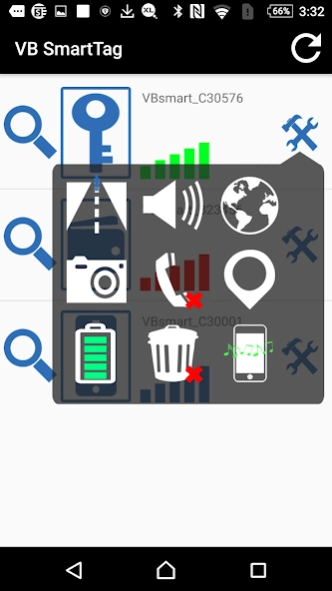
-Audible alert from the SmartTag in noisy environments or if the iphone is in mute mode. Example: When a call comes in, the SmartTag will provide an audible call alert to the user. (Call alert service can be audio or visual using LED’s to attract attention).
-Automatically sets Map location for user when ios device and tags are out of the "Link Lost" range (Handy for pinpointing missing items and their last known locations).
-The App supports "Airplane Mode".
-The App has multiple and user selectable “Alert Tones” for each individual tag.
-The App supports “Camera remote control function” enabling you to capture up to 10 photo images from using SmartTag as a remote control.
-Built-in advance power saving mode and reliable connectivity with high sensitivity.
-Support Android OS 4.3 and up
This App is intended solely for use with the VoyagerBlue SmartTag and WalletTag products, and will not perform any function in isolation.
About VB SmartTag
The company that develops VB SmartTag is DATA ACTION LLC. The latest version released by its developer is 2.20.
To install VB SmartTag on your Android device, just click the green Continue To App button above to start the installation process. The app is listed on our website since 2020-02-25 and was downloaded 0 times. We have already checked if the download link is safe, however for your own protection we recommend that you scan the downloaded app with your antivirus. Your antivirus may detect the VB SmartTag as malware as malware if the download link to com.data_action.vblocator is broken.
How to install VB SmartTag on your Android device:
- Click on the Continue To App button on our website. This will redirect you to Google Play.
- Once the VB SmartTag is shown in the Google Play listing of your Android device, you can start its download and installation. Tap on the Install button located below the search bar and to the right of the app icon.
- A pop-up window with the permissions required by VB SmartTag will be shown. Click on Accept to continue the process.
- VB SmartTag will be downloaded onto your device, displaying a progress. Once the download completes, the installation will start and you'll get a notification after the installation is finished.
Program Details
System requirements
Download information
Pricing
Version History
version 2.20 CallAlert
posted on 2020-02-25
- Android OS 9 Google Maps functions compatible bug fixed
version 2.19 CallAlert
posted on 2020-01-16
- Add Italian Language support from App.
version 2.18 CallAlert
posted on 2018-09-27
- Bug fixed: Mute Call Alert sound during on going call.
version 2.02
posted on 2016-03-24
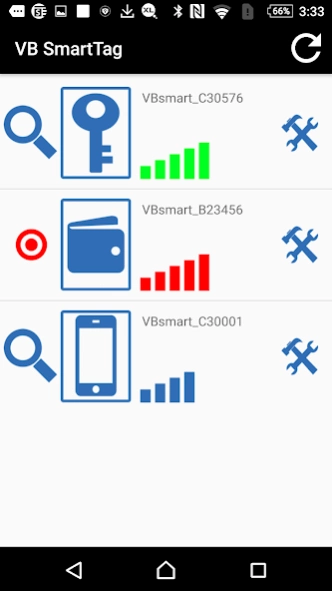
- Add WalletTag (SB21) Locator Function with visual aids.,SB21 WalletTag has no audio chamber ( beeper) by design.,During a lost signal alert condition you can initiate a 'Locator Function' and visual symbols,'Red-target' , can help locate a lost item tagged with a WalletTag, within 1-3 meters (3-9 foot) range limit.,you should then look within that 1-3 meters area for you lost item.,*If you walk slowly, you can get more accurate range.
Disclaimer
Official Google Play Link
We do not host VB SmartTag on our servers. We did not scan it for viruses, adware, spyware or other type of malware. This app is hosted by Google and passed their terms and conditions to be listed there. We recommend caution when installing it.
The Google Play link for VB SmartTag is provided to you by apps112.com without any warranties, representations or guarantees of any kind, so access it at your own risk.
If you have questions regarding this particular app contact the publisher directly. For questions about the functionalities of apps112.com contact us.
